You know that moment when you realize your website looks like it’s from 2010, and you think “I need a new website” – but then what? We get asked this question a lot, so we thought we’d show you exactly what happens from that first “help!” email to the day you’re proudly sharing your new site with everyone.
Why 6 Weeks? (And Why Not 6 Months)
Honestly, we used to take longer. Much longer. But here’s what we learned: when a project drags on for months, two things happen. First, you lose that initial excitement that sparked the whole thing. Second, by the time the site launches, your business has probably changed three times over.
Six weeks keeps everyone focused and energized. It’s like a sprint instead of a marathon – intense, but you can see the finish line from day one. Plus, we’ve done this enough times now to know exactly what can be accomplished in that timeframe without cutting corners.
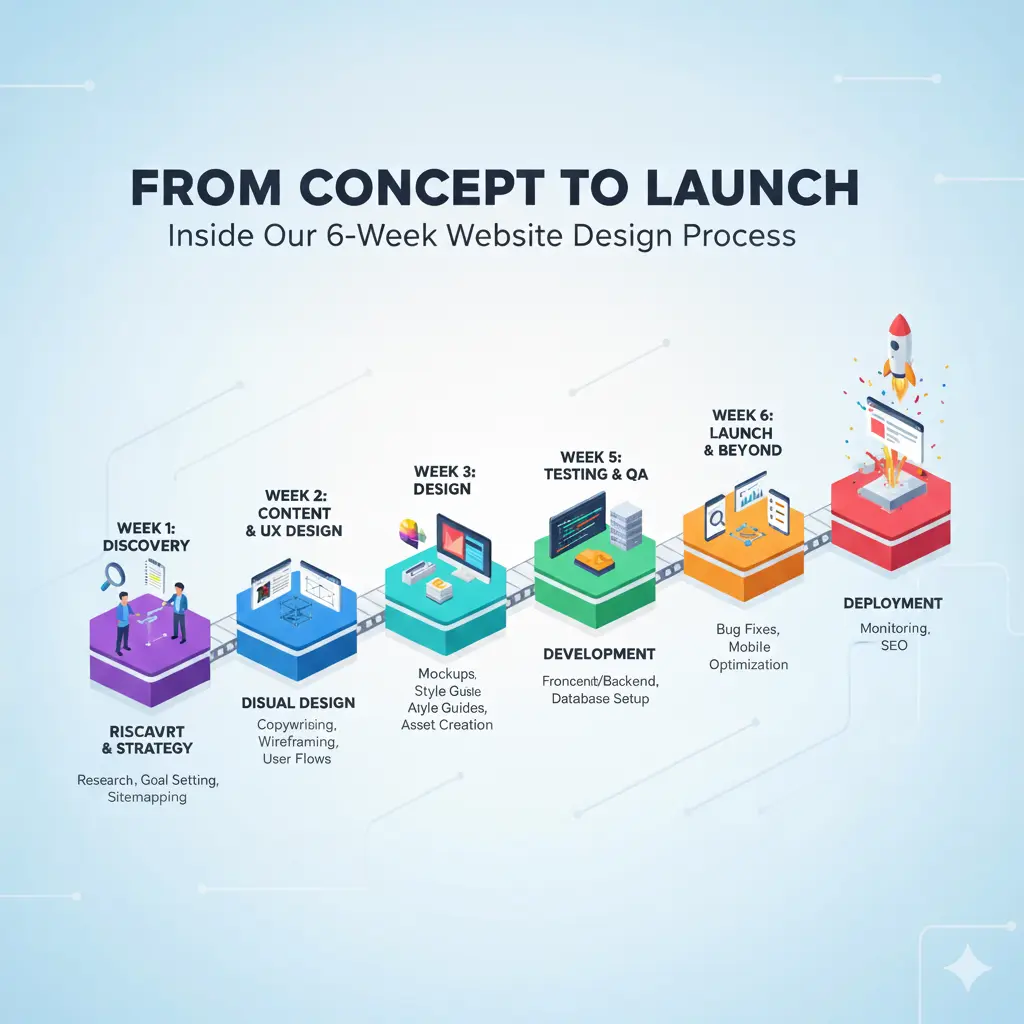
Week 1-2: Discovery & Strategy – The “Tell Us Everything” Phase
Getting to Know You (Really Know You)
This is where we turn into friendly interrogators. We’re not just asking about colors you like or websites you admire – we’re trying to crawl inside your business brain and understand what makes it tick.
Picture this: You walk into our first meeting saying you want “something professional but approachable.” By the end of our discovery sessions, we’ve learned that you’re actually trying to convince Fortune 500 companies to trust a 10-person startup with their most critical projects. Suddenly, “professional but approachable” means something completely different.
The Questions That Matter:
- What happens if your website doesn’t work? (Seriously – helps us understand the stakes)
- Who’s your dream customer, and what’s their biggest headache?
- What do people misunderstand about your business?
- If your competitor’s website makes you jealous, which one is it and why?
Recent Reality Check: A client told us their main goal was “looking modern.” After digging deeper, we discovered they were losing 40% of potential customers at the quote request stage because their old form was confusing. “Looking modern” became “streamlining the path to purchase.”
The Behind-the-Scenes Research
While you’re thinking through our questions (and probably wondering why we need to know so much), we’re doing our detective work:
- Stalking your competitors’ websites (legally, of course)
- Testing their user experiences to find weaknesses
- Analyzing what’s working in your industry
- Identifying the technical stuff you didn’t even know you needed
Deliverable: A strategy document that’s actually readable (no corporate buzzword bingo here) and becomes our North Star for everything that follows.
Week 3-4: Design & Wireframing – Where the Fun Begins
Wireframes: The “Ugly but Important” Stage
Okay, let’s be honest – wireframes look terrible. They’re basically gray boxes and squiggly lines that represent where everything goes. Your mom would not be impressed. But here’s why we start here: it’s way easier to say “move that box over there” than to redesign a beautiful page because we put the contact form in the wrong spot.
Think of it like planning the layout of your new kitchen before you pick out the fancy countertops. You want to make sure the fridge isn’t blocking the stove before you fall in love with marble backsplashes.
What We’re Figuring Out:
- Where does the important stuff go so people actually see it?
- How do we guide visitors from “just browsing” to “I want to work with these people”?
- What happens when someone visits on their phone while waiting for coffee?
- How many clicks does it take to find your contact info? (Spoiler: it should be zero)
Visual Design: When Things Get Pretty
This is the phase where family members start getting excited because they can finally see what the website will look like. We take those boring wireframes and transform them into something that makes you say “Yes! That’s exactly what I pictured!”
Homepage Magic: We spend extra time here because you only get one chance to make a first impression. Your homepage needs to answer three questions in about 5 seconds: Who are you? What do you do? Why should I care?
Interior Pages: Each page has a job to do. Your About page builds trust. Your Services page explains value. Your Contact page removes friction. We design each one with its specific purpose in mind.
Mobile-First Reality Check: Here’s a fun fact – most of your visitors will see your site on mobile first. So we design for phones first, then scale up. It’s like tailoring a suit – start with the measurements that matter most.
The Revision Dance (And Why It’s Actually Good)
Every client worries about being “difficult” during revisions. Don’t. This is where your website goes from good to great:
First Look: You’ll probably love 80% and want to tweak 20%. That’s perfect. Second Round: Usually smaller adjustments – colors, spacing, maybe rewording something. Final Polish: Those tiny details that make everything feel just right.
Real Talk: The clients who give us the best feedback get the best websites. “I don’t like this” is okay, but “This feels too corporate for our laid-back culture” helps us nail it.
Week 5-6: Development & Launch – Where Dreams Become Websites
Development: The “Holy Crap, It Actually Works” Moment
This is where our developers take your beautiful designs and make them actually do things. It’s like watching a movie set come to life – one day it’s just pretty pictures, the next day buttons click, forms submit, and everything moves the way it’s supposed to.
What’s Happening Behind the Scenes:
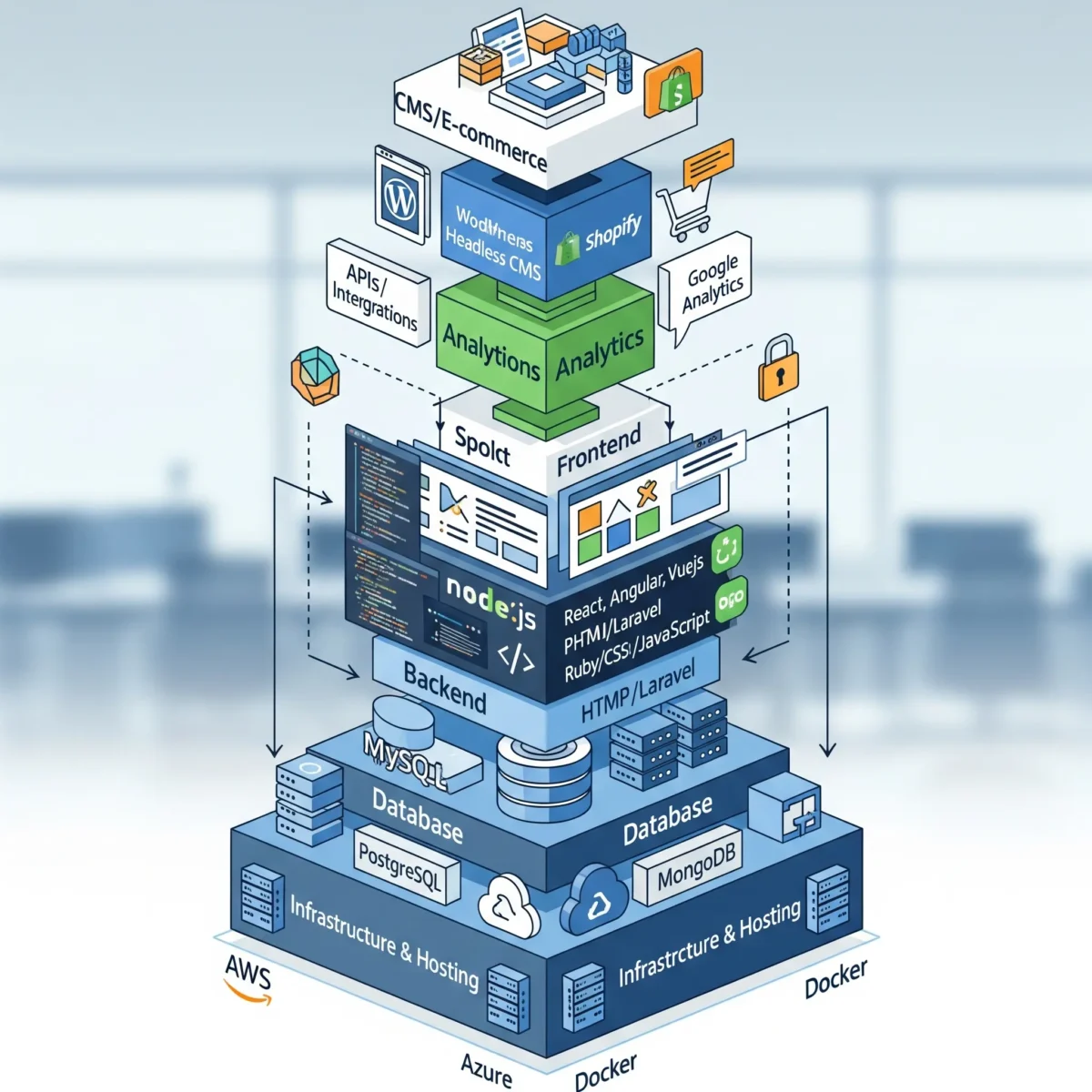
- Speed Optimization: We’re obsessed with loading times because your visitors have the attention span of goldfish (sorry, but it’s true)
- Mobile Magic: Making sure your site looks gorgeous whether someone’s on an iPhone 14 or their tablet from 2018
- SEO Setup: Building in the foundation so Google can find you (because the most beautiful website in the world is useless if nobody can find it)
- Security Stuff: All the boring-but-essential protections that keep hackers away from your business
Quality Assurance: The “Break Everything” Phase
We have a team member whose literal job is to try to break your website. Seriously. We call him our “chaos monkey,” and he’s really good at finding problems before your customers do.
Our Testing Checklist:
- Click every single button (even the ones that seem obvious)
- Fill out forms with weird information to make sure they handle it gracefully
- Test on different browsers (yes, people still use Safari)
- Try to access the site during peak internet traffic times
- Attempt to hack our own work (better us than someone else)
Pre-Launch: The Calm Before the Storm
Content Day: This is when your website starts feeling real. We integrate all your actual content – your real photos, your actual services, your real testimonials. Suddenly it’s not just a demo anymore; it’s your business’s new home on the internet.
The Final Walkthrough: You get to see everything working perfectly before anyone else does. It’s like a private movie screening, but for your website.
Training Time: We show you how to update content, add new pages, and handle basic maintenance. Don’t worry – we make it so simple that your least tech-savvy team member can handle it.
Launch Day: The Big Moment
Launch day used to be terrifying. Now it’s actually kind of exciting because we’ve done all the scary stuff already.
Morning: Final backups and safety checks (like putting on your seatbelt before driving) Go Time: Flipping the switch and watching everything work exactly as planned Monitoring: We’re watching your site like new parents watching a sleeping baby Celebration: Time for a well-deserved happy dance (we do this part virtually, but we’re definitely doing it)
What Makes Our Approach Different (Besides Our Terrible Dad Jokes)
We Actually Talk to You Like Humans
You know how some agencies make you feel like you need a computer science degree just to understand their emails? Yeah, we’re not those people. When we send updates, they sound like messages from a friend who happens to be really good at building websites.
What This Looks Like:
- Weekly check-ins that start with “Here’s what we got done this week…”
- Screenshots and previews, not just “design is in progress”
- Phone calls when email feels too impersonal
- Honest answers when you ask “is this normal?” (spoiler: usually yes)
Building for Five Years From Now, Not Just Today
We’ve seen too many businesses outgrow their websites within a year. That’s why we build with your future in mind:
Growth-Ready: When you’re ready to add that new service line or expand to new markets, your website can handle it Marketing-Friendly: Already set up for SEO, email marketing, and whatever advertising you want to try Analytics Built-In: So you can actually see what’s working and what isn’t Handoff Documentation: Clear instructions for anyone who needs to work on your site later
The Personal Touch in a Digital World
Technology is just a tool. What really matters is connecting with the humans who visit your website. We design for the person who’s browsing your site at 11 PM, trying to decide if you’re the right choice for their business.
Success Story: How We Helped TechFlow Solutions Stop Losing Customers
The Problem: Mark from TechFlow called us frustrated. “We’re losing deals to competitors with worse solutions but better websites,” he said. Their 8-year-old site was actively hurting their credibility.
Week 1-2 Reality Check: We discovered their biggest issue wasn’t the design – it was trust. IT directors couldn’t figure out if TechFlow was a serious enterprise solution or a garage startup. Their testimonials were buried, their case studies were hard to find, and their team page made them look like a two-person operation.
Week 3-4 Design Strategy: Instead of flashy graphics, we focused on credibility signals. We created a “proof” section right on the homepage, redesigned their case studies to tell compelling stories, and made their 15 years of experience impossible to miss.
Week 5-6 Development Results:
- 2.1-second load times (their old site took 8 seconds)
- Mobile experience that actually worked
- Lead capture forms that felt helpful, not pushy
- Integration with their CRM so no leads fell through cracks
Three Months Later: 40% increase in qualified leads, and Mark’s sales team stopped complaining about having to “overcome the website” in every pitch.
Let’s Talk Money and Timelines (The Stuff Everyone Wants to Know)
What You Get in Those 6 Weeks
- Complete website design and development (obviously)
- Mobile optimization (not optional in 2025)
- Basic SEO foundation (so Google knows you exist)
- Content management system (so you can make updates without calling us)
- One month of “new website jitters” support
- Training session (we’ll make sure you feel confident managing your new site)
When 6 Weeks Becomes 8 Weeks
We’re pretty good at hitting our timeline, but here’s when things might take longer:
- Complex Integrations: Connecting to your CRM, inventory system, or custom software
- Large E-commerce Sites: 500+ products need more time to set up properly
- Content Creation: If you need us to write copy or create graphics
- The Approval Bottleneck: When feedback takes weeks instead of days
Pro Tip: The fastest projects come from clients who can make decisions quickly and provide feedback within a few days. We’re not asking you to drop everything, but timely responses keep everything moving smoothly.
How to Be Our Favorite Client (And Get the Best Results)
Come Prepared, But Don’t Stress About Perfection
Bring What You Have:
- Your logo (even if it’s just a Word document version)
- Photos of your team, products, or office (phone pics are totally fine)
- Any existing content, even if it needs work
- Login details for your current site, social media, whatever we might need
Most Important: Someone who can make decisions. Nothing slows down a project like “I need to check with my business partner who’s on vacation in Europe.”
How to Give Feedback That Actually Helps
Instead of: “I don’t like it” Try: “This feels too formal for our brand”
Instead of: “Make it pop” Try: “Our competitors all look the same – how can we stand out?”
Instead of: “Can we try something different?” Try: “I love the layout, but the colors don’t feel right for our audience”
Specific feedback helps us fix things quickly instead of playing guessing games.
After Launch: When the Real Fun Begins
Month One: The Honeymoon Period
Your new website is live, and you’re probably checking it obsessively (we all do this). We’re monitoring everything to make sure the launch goes smoothly, fixing any tiny issues that pop up, and helping you get comfortable with your new content management system.
What Usually Happens: You’ll want to make small tweaks as you see your site in action. That’s totally normal, and we’ve got you covered.
Long-Term Partnership
Your website isn’t like a painting you hang on the wall and forget about. It’s more like a garden that grows and improves over time:
Monthly Maintenance: Keeping everything updated, secure, and running smoothly Performance Monitoring: Making sure your site stays fast as you add content Growth Planning: Adding new features as your business evolves
The Best Part: Watching your website actually help your business grow. When clients tell us “we got our biggest deal ever through the website,” that’s what makes all the late nights worth it.
Ready to Start Your Website Journey?
Look, we could keep talking about processes and timelines all day, but the best way to understand if we’re a good fit is just to have a conversation. No pressure, no sales pitch – just an honest discussion about your business and what you’re trying to accomplish.
What Happens Next: We’ll spend 30-45 minutes learning about your business, goals, and timeline. By the end of our call, you’ll know exactly what your project would look like, what it would cost, and whether we’re the right team for the job.
Fair Warning: We might ask you questions you haven’t thought about yet. That’s not us being difficult – it’s us making sure your website actually serves your business goals instead of just looking pretty.
Curious about working together? Tired of your current website making you cringe? Ready to stop losing customers to competitors with better online presence? Let’s talk. We promise to give you straight answers, realistic timelines, and honest advice – even if that means we’re not the right fit for your project.